Emphatic Thermometry
:date: 2026-01-08 19:55
The start of winter has been intense for us. We have had nearly five weeks where the temperature almost never got above freezing. One of those times that it did preceded some of the toughest winter weather I've ever seen.

Finally yesterday we returned to milder, normal winter weather. It turns out that being outside in -6F/-17C is a very different experience than the 41F/5C we got today. Exactly what the temperature is turns out to be a very important detail!
How can we know what the temperature is? Assuming it has not yet been bombed by fascists, we can ask the good people at weather.gov. But there are a lot of micro-climates in my area and, for example, they're off by 2F/1C right now; in other words, perhaps their reading is correct, but for some other place near by.
We could buy one of these.

I bought this almost exactly three years ago and when I moved here the remote sensor stopped working. So that was very frustrating. It does a few things but an outdoor temperature measurement was really the job I cared the most about.
In our bedroom we have a clock with an external temperature sensor but I'm finding that on the coldest most interesting nights, the AAA batteries suffer and just can not transmit the readings. Also replacing disposable batteries at all is suboptimal for this kind of permanent application.
I recently ordered one of these Toko snow thermometers.

I didn't really know what it was but it turned out to be a bulb thermometer in a protective cover. Ok, fine. That's simple. I liked my last bulb thermometer that I used in the 1990s — until it suffered from a "separated column". I used this Toko thermometer twice before it becaome useless after suffering the same problem.
Ok, this was all starting to make me grumble. As a computer nerd I knew that this just can not be so damn hard. I was reminded of a project I had done in 2008 where — with the help of a Russian robotics genius — I got a DS1820 analog temperature sensor publishing to a 1-Wire bus and then FUSE mounted into a Linux filesystem. That worked fine and I still have the hardware. Here is a photo of it in action with a computer that still had an RS-232 serial port!
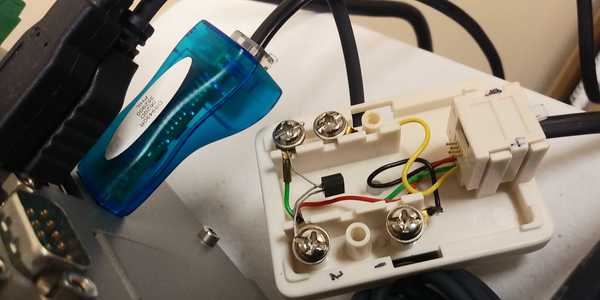
I figured, ok, I don't have access to my Russian friend, but surely after 18 years, this kind of nerdery is a little less esoteric and surely it has improved quite a bit. Indeed it has!
Looking around I found this nice video from DroneBot Workshop and he did a good job covering the features of various temperature sensors.

I was so impressed that when the video went on to describe a plausible system that could be built, I was ready to not second guess it.
He basically recommended using a Texas Instruments TMP117 temperature sensor. I noticed some of the sensors had a low range of 0C which would be pretty much useless to me. Many have a lower limit of -40C/F. The TMP117 with its -55C/-67F seemed just right. The sensor itself is $3.40 — or $2.27 if you'd like 1000 of them.
The next question is what kind of computer would interact with this sensor? I could have used a Linux friendly Raspberry Pi Zero or something like that, but it turns out that if all you need to do is run a single program that just reads a temperature sensor, having a sophisticated multi-user, multitasking operating system is quite overkill.
What is needed is a microcontroller. He had selected an Espressif ESP32-C6. If you buy just the IC (integrated circuit, i.e. the chip itself) you can get them for $1.86. This is a 2.4GHz 32-bit RISC processor with 512kB of RAM. This tiny chip also contains a radio and antenna for WiFi and Bluetooth. And a gazillion other astonishing features — here is its datasheet.
In theory I could buy the raw surface mount ICs and do microsurgery with a soldering iron to hook them up. But I'm more realistic than that. It turns out that ICs like these usually are sold to big companies who are integrating them into their own circuit boards. Or they are sold by a kind of middle man who makes what is called a development board. The dev board basically has the IC mounted properly to it (generally with some Taiwanese surface mount solder voodoo). The board has leads to each of the chip's pins so that it's easier to connect things. Some boards add bonus features like LEDs and push buttons that serve very common helpful functions.
The project I was following along with went with the Adafruit TMP117 dev board. $11.50.

Notice how the actual TMP117 IC is on a little cutout island. This is to avoid picking up heat from the circuit board itself.
Ok, that's nice. But for the other components he used Sparkfun dev boards. Since shipping is a big portion of the cost, it seemed dumb to split the parts into two sources. I took a huge gamble that the Sparkfun TMP117 dev board would also be suitable. $16.95.

Spoiler alert - thankfully it worked fine. Also note that this board didn't put a (heat generating) resistor on the thermally isolated island.
For the microcontroller devboard I stayed with the SparkFun Qwiic Pocket Development Board - ESP32-C6. $19.95

And for $10.95 it seemed like a good deal to add a completely optional OLED display.

Once all this stuff arrived I was still not really at the starting line. The sensor and the display can't do anything without the microcontroller, and the microcontroller can't do anything without a program to run. This thing needed to be programmed.
Step one was simply getting a program to print out a "Hello world" confirmation message. Easy, right? Well, no. I spent nearly two weeks fucking around with this. To install software on a microcontroller one generally needs to use a program called Arduino-IDE, the annoying GUI code editor for developing Arduino brand chips. Why did a whole new extraneous company just get interjected? Because as smart as electrical engineers usually are, this is where they are stupid. When it comes to software, they try as hard as they can to not understand what they are doing. At least that's what Arduino-IDE is screaming to me.
I found this GUI bewildering and hostile to my refined Vim sensibilities. I had to claw my way to getting any functionality out of this device including a harrowing descent into the madness that is Windows (on a qemu VM).
Here is a brief look at this shite programming quagmire where I am trying to program literally the simplest thing possible.

You can see I needed two projects (sketchily called "sketches") to be open so that I could see both the compile output (most of which was disabled by default) and the serial output at the same time. Especially on Windows, the compile took forever and these people seem to be unaware of make or a sane DAG build tool.
If you want to read about all of my frustrations with the process, here is my detailed forum post.
Eventually I got it to do something from Windows. Then I got it to finally output to the serial bus. Then I got it to work from Linux. Then I finally got it to run software which I had modified from the project template I was following. At last I was in control of this thing and on the software starting line.
Here's my setup assembled and finally working.

Here it is outside hooked up to a couple of USB rechargeable battery packs.

Here is a demonstration of the ESP32 running a web server that I can contact over wifi; it presents the temperature in a custom web interface.

I am more comfortable looking at a command line output where I can see
the trends a bit more as shown in the terminal window. For example,
that perspective immediately tips one off to the fact that in the
original project software, redundant readings (fahrenheit) are
wasting bandwidth; I would have chosen to send the original sensor's
exact bits with no degradation. But obviously now that I control
this thing, the only limitations are the fundamental laws of physics.
There is still a lot to be done with this project. I'd like to add more sensors and i need to do testing on battery charging and radio range. But I now finally have a system that produces highly accurate temperature readings that I have complete control over and which are transmitted to me conveniently on demand over wifi. Finally some progress.